Introduction
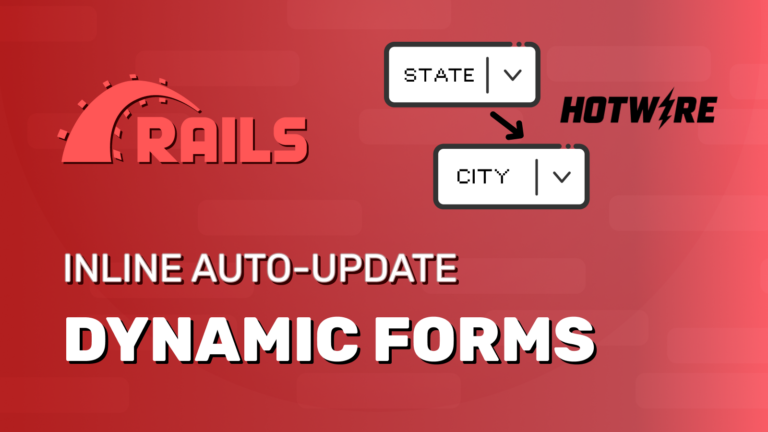
Have you ever needed to create dependent fields in a form? Selecting a Country, updates the States select. Or if you select a role (standard/manager/admin) it loads specific fields for the role.
I will share my reusable solution using Ruby on Rails and Hotwire that supports an arbitrary level of "nested dependents".
Check the youtube tutorial video
https://www.youtube.com/@DoCodeDo
Example Scenario Overview
We’re going to build a generic solution that you can reuse in any form with dependent fields.
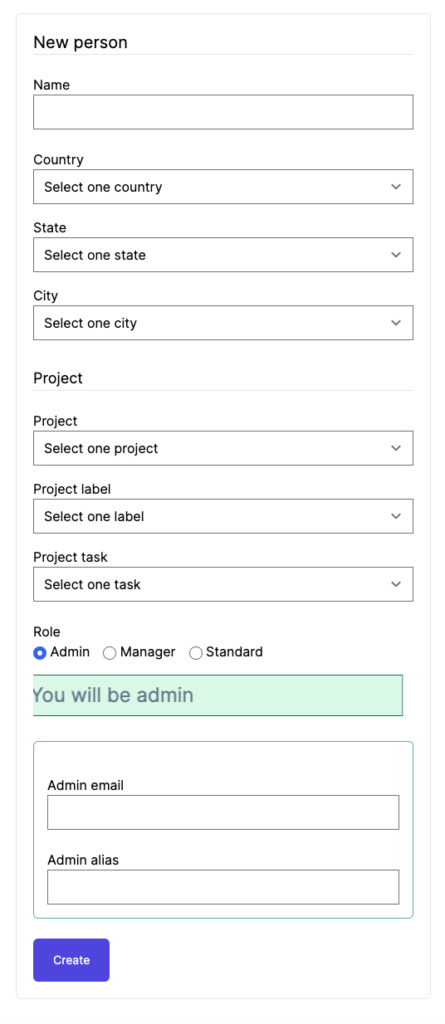
Our example form is the following:


What we want?
- Selecting a Country updates State / City select
- Selecting a State updates City select
- Selecting a Project
- Updates Project label select
- Updates Project task select
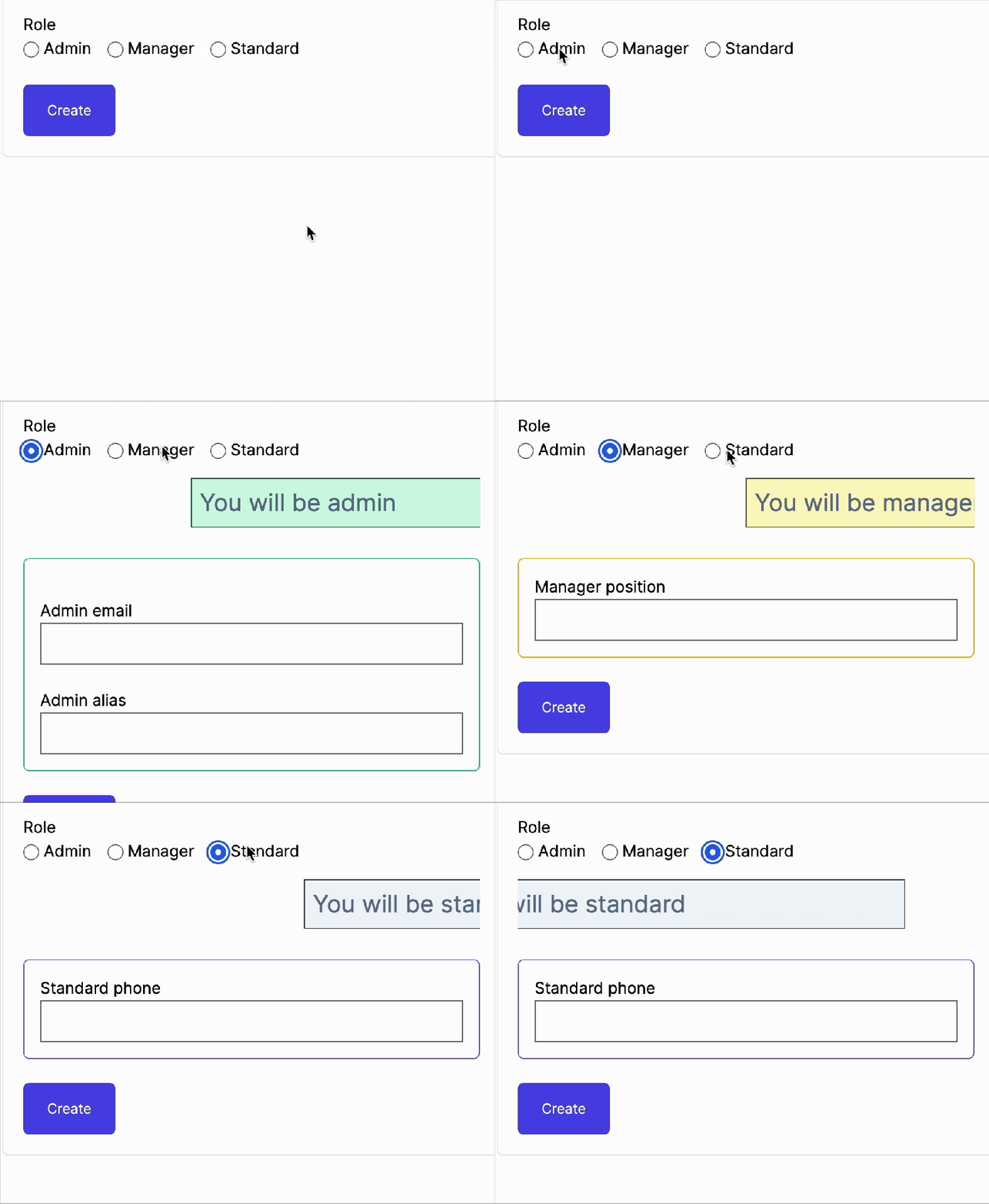
- Choosing a role, it shows specific fields for the selected role
You can clone the project here:
https://github.com/viniciusoyama/rails-dynamic-fields-example
The solution
Solution Overview
This is what we’ll do:
- Use a
DependentFieldsControllerstimulus controller to handle the update of the dependent selects. When a parent changes, the dependents are updated via turbo stream. - Any parent field like
Country,StateandProjectshould listen for changes and call a method to update the dependent fields accordingly. - For the dependent fields:
- We will wrap them in a turbo frame. Example:
- the
Statewill be in aperson_states_selectturbo frame. - the
Citywill be in aperson_cities_selectturbo frame. - the
Project fields (label + task)are in aproject_dependent_fieldsturbo frame (just one) - the Roles specific fields are inside a
role_dependent_fieldsturbo frame
- the
- Each turbo frame has data attributes to set the URL for the update and also the name of the request parameter used for sending the value selected on the parent field (the one that triggered the updated)
- We will wrap them in a turbo frame. Example:
- If a field that has dependents is updated, all their dependent fields are updated. This covers a case where a
Cityis already selected and we change theCountry: it automatically updates theStateand theCityselects. More on this later.
Solution Code
The models
We have a Person model with a all the fields being just a string:
- Name – string
- Country – string
- State – string
- City – string
- Role – string
- Project – String
- Project Label – String
- Project Task – String
- .. and so on
For the sake of this example, I won’t use relations. Only string values. All other "models" are just hardcode pure ruby classes. Some examples:
person.rb
class Person < ApplicationRecord
  validates :name, presence: true
  validates :country, presence: true
  validates :state, presence: true
  validates :city, presence: true
end
country.rb
class Country
  def self.all
    ['USA', 'Mexico', 'Canada']
  end
end
state.rb
class State
  STATES = {
    'USA' => ['California', 'New York', 'Texas'],
    'Mexico' => ['Jalisco', 'Mexico City', 'Yucatán'],
    'Canada' => ['Ontario', 'Quebec', 'British Columbia']
  }

  def self.find_by_country(country)
    STATES[country] || []
  end
end
The other models follows the same idea. If you want to check, you can clone the project here:
https://github.com/viniciusoyama/rails-dynamic-fields-example
The controller and views
The people_controller.rb is our well know scaffold CRUD controller.
But it has new actions (turbo stream) to update the dependent fields. Examples:
  def states_select
    @states = State.find_by_country(params[:country])
  end

  def cities_select
    @cities = City.find_by_state(params[:state])
  end

  def project_dependent_fields
    @project = params[:project]
  end

  def role_dependent_fields
    @role = params[:role].downcase
  end
Here’s the entire controller if you want to check: https://github.com/viniciusoyama/rails-dynamic-fields-example/blob/main/app/controllers/people_controller.rb
The Views
Nothing new here. Just a a normal form with some partials _form.html.erb, _states_select.html.erb, _cities_select.html.erb , _project_dependent_fields.html.rb and _role_dependent_fields.html.erb.
Here are the highlights.
We set the form to use the stimulus DependentFieldsController
<%= form_with(model: person, data: { controller: 'dependent-fields' }) %>
...
<% end %>
Any parent fields are targets for the stimulus controller
- when they are connected, the stimulus controller adds a listener for a
changeevent - they also has an data attribute with the selector for the turbo frame that should be updated
Example with country parent field:
<%= form.select :country, options_for_select(Country.all), { prompt: 'Select one' },
    data: {
      dependent_fields_target: "hasDependents",
      dependant_turbo_frame_selector: '#person_states_select'
    } %>
<% end%>
If you need to know more about Stimulus Targets, check the doc: https://stimulus.hotwired.dev/reference/targets
Dependent fields are wrapped in a Turbo frames tag with data attributes for:
- the url that should be called for the update
- the request param name that would receive the value of the parent field that has changed
Example with states field:
<%= turbo_frame_tag 'person_states_select', data: {
    update_url: states_select_people_url,
    request_param_name: 'country'
  } do %>
  <div class="mt-4">
    <%= form.label :state, style: "display: block" %>
    <%= form.select :state, options_for_select(states), { prompt: 'Select one state' },
    class: 'w-full',
    data: {
      dependent_fields_target: "hasDependents",
      dependant_turbo_frame_selector: '#person_cities_select'
    } %>
  </div>
<% end %>
Views Full Code
The dependent fields are separated in partials so we can also render them in turbo streams actions when doing the update.
_form.html.erb
<%= form_with(model: person, data: { controller: 'dependent-fields' }) do |form| %>
  <% if person.errors.any? %>
    <div style="color: red">
      <h2><%= pluralize(person.errors.count, "error") %> prohibited this person from being saved:</h2>

      <ul>
        <% person.errors.each do |error| %>
          <li><%= error.full_message %></li>
        <% end %>
      </ul>
    </div>
  <% end %>

  <div class="mt-6">
    <%= form.label :name, style: "display: block", class: '' %>
    <%= form.text_field :name %>
  </div>

  <div class="mt-6">
    <%= form.label :country, style: "display: block", class: '' %>
    <%= form.select :country, options_for_select(Country.all), { prompt: 'Select one' },
    data: {
      dependent_fields_target: "hasDependents",
      dependant_turbo_frame_selector: '#person_states_select'
    } %>
  </div>

  <%= render partial: 'states_select', locals: { form: form, states: State.find_by_country(@person.country) } %>

  <%= render partial: 'cities_select', locals: { form: form, cities: City.find_by_state(@person.state) } %>

  <h1 class="border-b text-lg border-gray-200 mt-8 mb-4">Project</h1>

  <div class="mt-6">
    <%= form.label :project, style: "display: block", class: '' %>
    <%= form.select :project, options_for_select(Project.all), { prompt: 'Select one' },
    data: {
      dependent_fields_target: "hasDependents",
      dependant_turbo_frame_selector: '#project_dependent_fields'
    } %>
  </div>

  <%= render partial: 'project_dependent_fields', locals: { form: form, project: @person.project } %>

  <div class="mt-6">
    <%= form.submit 'Create', class: 'btn-primary btn-xl' %>
  </div>

<% end %>
_states_select.turbo_stream.erb
<%= turbo_frame_tag 'person_states_select', data: {
    update_url: states_select_people_url,
    request_param_name: 'country'
  } do %>
  <div class="mt-4">
    <%= form.label :state, style: "display: block" %>
    <%= form.select :state, options_for_select(states), { prompt: 'Select one' },
    data: {
      dependent_fields_target: "hasDependents",
      dependant_turbo_frame_selector: '#person_cities_select'
    } %>
  </div>
<% end %>
_cities_select.html.erb
<%= turbo_frame_tag 'person_cities_select', data: {
    update_url: cities_select_people_url,
    request_param_name: 'state'
  } do %>
  <div class="mt-4">
    <%= form.label :city, style: "display: block" %>
    <%= form.select :city, options_for_select(cities), prompt: 'Select one' %>
  </div>
<% end %>
_project_dependent_fields.html.erb
<%= turbo_frame_tag 'project_dependent_fields', data: {
    update_url: project_dependent_fields_people_url,
    request_param_name: 'project'
  } do %>
  <div class="mt-4">
    <%= form.label :project_label, style: "display: block" %>
    <%= form.select :project_label, options_for_select(ProjectLabel.find_by_project(project)), prompt: 'Select one' %>
  </div>

  <div class="mt-4">
    <%= form.label :project_task, style: "display: block" %>
    <%= form.select :project_task, options_for_select(ProjectTask.find_by_project(project)), prompt: 'Select one' %>
  </div>
<% end %>
_role_dependent_fields.html.erb
<%= turbo_frame_tag 'role_dependent_fields', data: {
    update_url: role_dependent_fields_people_url,
    request_param_name: 'role'
  } do %>

  <% if role == 'standard' %>
    <marquee scrollamount="20"><p class="border-indigo-800 border bg-slate-100 p-2 text-slate-500 text-2xl">You will be standard</p></marquee>
    <div class="p-4 mt-6 border border-indigo-500 rounded-md">
      <%= form.label :standard_phone, style: "display: block", class: '' %>
      <%= form.text_field :standard_phone, class: 'w-full' %>
    </div>

  <% end %>

  <% if role == 'manager' %>
    <marquee scrollamount="20"><p class="border-yellow-800 border bg-yellow-100 p-2 text-slate-500 text-2xl">You will be manager</p></marquee>
    <div class="p-4 mt-6 border border-yellow-500 rounded-md">
      <%= form.label :manager_position, style: "display: block", class: '' %>
      <%= form.text_field :manager_position, class: 'w-full' %>
    </div>
  <% end %>

  <% if role == 'admin' %>
    <marquee scrollamount="20"><p class="border-emerald-800 border bg-emerald-100 p-2 text-slate-500 text-2xl">You will be admin</p></marquee>
    <div class="p-4 mt-6 border border-emerald-500 rounded-md">
      <div class="mt-6">
        <%= form.label :admin_email, style: "display: block", class: '' %>
        <%= form.text_field :admin_email, class: 'w-full' %>
      </div>
      <div class="mt-6">
        <%= form.label :admin_alias, style: "display: block", class: '' %>
        <%= form.text_field :admin_alias, class: 'w-full' %>
      </div>
    </div>
  <% end %>
<% end %>
The turbo streams views
These are the views rendered when a field update is called. We just use a new person to be able to use a form builder.
states_select.turbo_stream.erb
<%= form_with(model: Person.new) do |form| %>
  <%= turbo_stream.replace 'person_states_select',
    partial: "states_select", locals: {
      form: form,
      states: @states
    }
  %>
<% end %>
cities_select.turbo_stream.erb
<%= form_with(model: Person.new) do |form| %>
  <%= turbo_stream.replace 'person_cities_select',
    partial: "cities_select", locals: {
      form: form,
      cities: @cities
    }
  %>
<% end %>
project_dependent_fields.turbo_stream.erb
<%= form_with(model: Person.new) do |form| %>
  <%= turbo_stream.replace 'project_dependent_fields',
    partial: "project_dependent_fields", locals: {
      form: form,
      project: @project
    }
  %>
<% end %>
role_dependent_fields.turbo_stream.erb
<%= form_with(model: Person.new) do |form| %>
  <%= turbo_stream.replace 'role_dependent_fields',
    partial: "role_dependent_fields", locals: {
      form: form,
      role: @role
    }
  %>
<% end %>
Be aware that the turbo stream view/response is not 100% valid but works
The response starts with a <form> tag and not with a <turbo-stream>. Because the view starts with a <%= form_with ...
It works because the turbo library just looks for all the <turbo-stream> tags.
And, to be honest, I don’t think that this will change.
But if you want to be 100% compliant you would have to do something like this:
<% response = nil %>

<% form_with(model: Person.new) do |form| %>
  <% response = capture do %>
    <%= turbo_stream.replace 'person_states_select',
      partial: "states_select", locals: {
        form: form,
        states: @states
      }
    %>
  <% end %>
<% end %>

<%= response %>
Now, the view doesn’t capture the <form> tag. (take a look. We’ve removed the = before the form_with).
We capture the the turbo frame with the select field in a variable (it will not go to the view).
And the view capture the response at the end with <%= response %>
Also, I would put this logic in a helper so we can reuse in other views.
Example with helper
  def capture_for_dynamic_fields(model, &block)
    response = nil

    form_with(model: model) do |form|
      response = capture(form, &block)
    end

    response
  end
Now you can do this in the view:
<%= capture_for_dynamic_fields(Person.new) do |form| %>

  <%= turbo_stream.replace 'person_states_select',
    partial: "states_select", locals: {
      form: form,
      states: @states
    }
  %>

<% end %>
Could the request to states_select/cities_select/project_dependent_fields/role_dependent_fields be a HTML type instead of a turbo stream type?
Yes. If we’ve had created .html.erb views with <%= turbo_frame_tag '..' %> ... < % end> it would work. But I prefer to use turbo streams because it allows us to respond with more than one change so if you want to show a notification about the field being updated or do anything else, now we can.
The stimulus controller
The logic is straightforward:
- All parents fields are targets for the controller
- When a parent field changes, it updates the dependent(s) turbo frame(s) with new content using the parameters from the parent or the turbo frame data attributes.
- This also works fine with radio buttons. The change event is triggered only when radio buttons are checked so, even when we are choosing a option with other already checked, it doesn’t trigger twice (the uncheck doesn’t trigger a change event).
- The update is handled by the
updateTurboFramesfunction.
dependent_fields_controller.js
import { Controller } from "@hotwired/stimulus"

function updateTurboFrames(turboFrameSelector, requestParamValue) {
  const elements = document.querySelectorAll(turboFrameSelector)

  elements.forEach((turboFrame) => {

    if (!turboFrame.hasAttribute('data-update-url')) {
      console.warn(`Turbo frame with selector ${turboFrameSelector} is missing the 'data-update-url' attribute`)
      return
    }

    if (!turboFrame.hasAttribute('data-request-param-name')) {
      console.warn(`Turbo frame with selector ${turboFrameSelector} is missing the 'data-request-param-name' attribute`)
      return
    }

    const updateUrl = turboFrame.getAttribute('data-update-url')
    const requestParamName = turboFrame.getAttribute('data-request-param-name')

    const fullURL = new URL(updateUrl);
    fullURL.searchParams.set(requestParamName, requestParamValue);
    fullURL.searchParams.set('format', 'turbo_stream');

    turboFrame.src = fullURL.toString();

    turboFrame.reload()
  })
}

export default class extends Controller {
  static targets = [ "hasDependents" ]

  hasDependentsTargetConnected(element) {

    if (!element.hasAttribute('data-dependant-turbo-frame-selector')) {
      console.warn(`hasDependents element is missing the 'data-dependant-turbo-frame-selector' attribute`)
      return
    }

    const turboFrameSelector = element.getAttribute('data-dependant-turbo-frame-selector')

    element.addEventListener('change', () => {
      updateTurboFrames(turboFrameSelector, element.value)
    })
  }

  hasDependentsTargetDisconnected(element) {
    // If the form using this controller is disconnecting
    // We don't want to trigger this update
    // This is for edge cases where a existing form is being replaced
    // With a new instance of the same form
    // Without this condition a request (with an empty param value) to update the dependent turbo frames will be triggered
    // And the response will replace the content of the new form (which could already have the dependent content loaded)
    // With an empty state dependent content
    if (this.isDisconnecting != true) {
      const turboFrameSelector = element.getAttribute('data-dependant-turbo-frame-selector')
      updateTurboFrames(turboFrameSelector, '')
    }
  }

  disconnect() {
    this.isDisconnecting = true
  }

}
As you can see, thanks for the hasDependentsTargetDisconnected hook on the Stimulus controller, if we choose a Country, State and City and change a Country after that:
- it would trigger an update on the State Field
- This updated would remove the old State select to add the new one
- The removal would trigger the disconnected hook and the cities will be reloaded (with no options) because we haven’t selected a state yet
You can check more here: https://stimulus.hotwired.dev/reference/targets#connected-and-disconnected-callbacks
Be careful with the turbo frame SRC attribute
We don’t want to set the SRC direct when rendering the partial on the server. It would trigger a request to the url right after the first page load. We don’t need that.
Updating multiple fields at once example
In our project/project labels/project tasks example, I’ve wrapped the two dependent selects in one turbo frame. When we change a project, it updates that turbo frame so the two fields (project label and project task) are updated at the same time using only one turbo frame.
If the two dependent selects (task and label) needed to stay apart in different turbo frames, it also would be possible to update both at the same time. Just add the same class to both turbo frames and use this class as the selector instead. Each frame should have it’s own URL to fetch the update.
You can have anything inside the dependent turbo frame
I don’t know if you’ve notice but you can put anything inside the dependent turbo frame.
That means that you can have any kind of HTML content.
Take a look at the role example (standard, manager or admin) where the turbo frame has a animated text inside.
Conclusion
With this approach, we’ve got a clean, reusable solution for dynamic dependent fields that leverages the full power of Hotwire with Rails.
You can now reuse the same stimulus controller across different forms and even have multiple sets of dependent selects on the same form.
Less code, more fun.
Subscribe to my newsletter!
I share content about Software Development & Architecture, Entrepreneurship and Lifelong Learning