Check the youtube tutorial video
https://www.youtube.com/@DoCodeDo
Introduction
We’re building a simple app with three core entities: Projects, Sprints, and Tasks.
These entities are related to each other as follows:
- A Project has many Sprints.
- A Sprint has many Tasks.
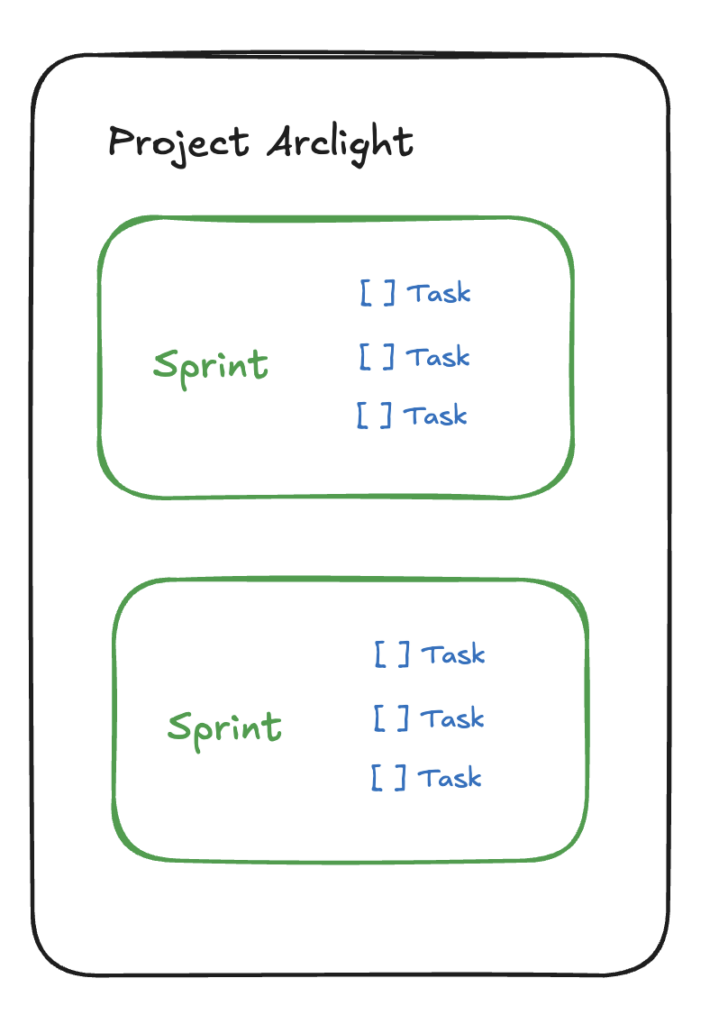
We have our know CRUD operations for each of these models using Rails scaffolding.
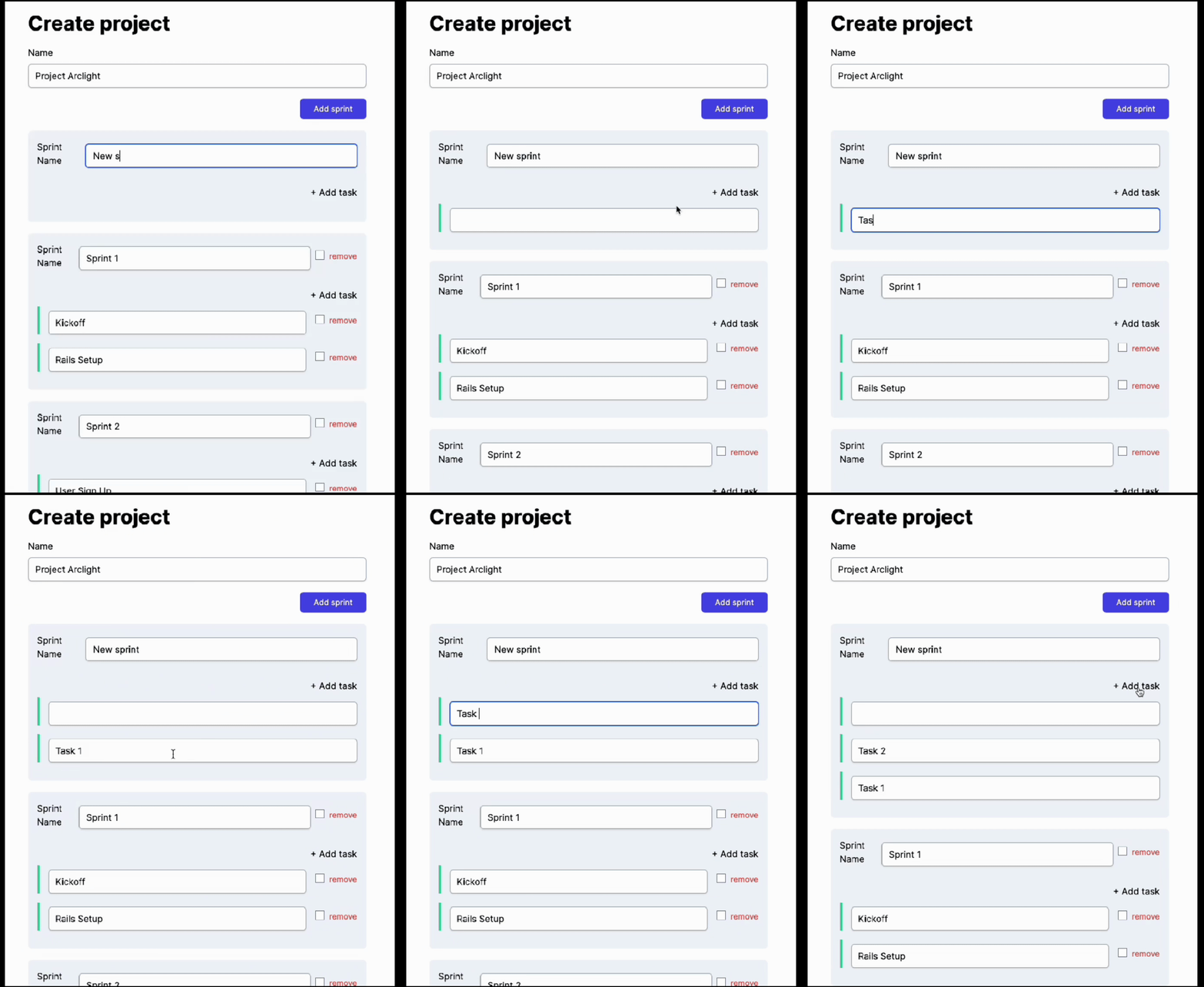
At this point, we can create projects, sprints, and tasks individually through separate forms.
But what if we want to create all of them at the same time using a single form?
That’s where Rails Nested Attributes come in.
The code is available in this repository:
https://github.com/viniciusoyama/rails-nested-fields-example
Using Nested Attributes
Nested attributes is a Rails feature connecting models, views, and controllers that allows us to achieve our goal.
Defining Nested Attributes in the Model
We use the accepts_nested_attributes_for method in the parent model.
In our case, the Project is the parent, and the Sprint is the child.
class Project < ApplicationRecord
  validates :name, presence: true

  has_many :sprints, dependent: :destroy
  accepts_nested_attributes_for :sprints,
    reject_if: -> (attributes) { attributes[:name].blank? },
    allow_destroy: true
end
This tells Rails that the project form can accept attributes for sprints.
The allow_destroy: true option allows users to delete sprints, and reject_if ensures that if a sprint name is left blank, it will be ignored.
Creating Nested Fields in the View
In the projects form, we use fields_for to create fields for the sprints.
The fields_for method allows us to iterate through the sprints array and build the necessary form fields for each sprint.
<%= form.fields_for(:sprints) do |sprint_form| %>
    <%= render partial: 'sprint_form', locals: { sprint_form: } %>
<% end %>
Handling Nested Parameters in the Controller
In the controller, we need to permit the nested parameters. The parameters will look something like this:
params[project][sprints_attributes][0][name]
params[project][sprints_attributes][1][name]
def project_params
  params.require(:project).permit(:name,
    sprints_attributes: [
      :id, :name,
  ])
end
Now, we can create or update a project along with its sprints using the same form.
At this stage, if we visit the project form, we might not see any sprints because the sprints array is empty by default.
We can manually initialize it with a few sprints like this:
@project.sprints.build
@project.sprints.build
@project.sprints.build
Now, we can create a project with up to 3 sprints in a single form.
Removing Nested Fields
Removing sprints is just as easy.
By using a checkbox labeled _destroy, we can mark a sprint for deletion. When the form is submitted, the sprint will be deleted from the database.
  <label class="flex gap-2 text-sm text-red-500">
    <%= sprint_form.check_box :_destroy %>
    <span>remove</span>
  </label>
Don’t forget to permit the _destroy attribute in the controller:
def project_params
  params.require(:project).permit(:name,
    sprints_attributes: [
      :id, :name, :_destroy,
  ])
end
Adding New Nested Fields Dynamically
So far, we can create a project with a fixed number of sprints, but what if we want to add more sprints dynamically, without reloading the page? We can achieve this using JavaScript and StimulusJS.
First, we create a hidden template for a new sprint form inside the project form.
We use a special child_index placeholder that we’ll be replaced with a new index using JavaScript:
  <div class="my-4 flex flex-col"
     data-controller='nested-form'
     data-nested-form-pattern-to-replace-with-index-value="SPRINT_INDEX"
  >

    <template data-nested-form-target="formTemplate">
      <%= form.fields_for(:sprints, Sprint.new, child_index: "SPRINT_INDEX") do |sprint_form| %>
        <%= render partial: 'sprint_form', locals: { sprint_form: } %>
      <% end %>
    </template>
    <div class="text-right">
      <span class="btn-primary cursor-pointer btn-sm" data-action="click->nested-form#addItem">Add sprint</span>
    </div>

    <div data-nested-form-target="itemsList">
      <%= form.fields_for(:sprints) do |sprint_form| %>
        <%= render partial: 'sprint_form', locals: { sprint_form: } %>
      <% end %>
    </div>
  </div>
Next, we create a StimulusController to manage adding new sprints when the add sprint button is clicked.
The controller replaces the SPRINT_INDEX placeholder with a new random number (current date) and adds the sprint form to the page.
import { Controller } from "@hotwired/stimulus"

export default class extends Controller {
  static targets = [ "formTemplate", "itemsList" ]
  static values = {
    patternToReplaceWithIndex: String
  }

  addItem(e) {
    e.preventDefault(); e.stopPropagation();

    this.itemsListTarget.insertAdjacentHTML('afterbegin', this.generateFormHTML())
  }

  generateFormHTML() {
    const html = this.formTemplateTarget.innerHTML.toString()

    return html.replaceAll(this.patternToReplaceWithIndexValue, new Date().getTime())
  }
}
If you’re worried because the new index doesn’t follow a strict sequence, don’t. It works fine.
Do We Have to use a Sequential Number for the New Nested Item?
If we use the number of sprint items in the list for the next index it would also work:
  generateFormHTML() {
    const html = this.formTemplateTarget.innerHTML.toString()

    return html.replaceAll(this.patternToReplaceWithIndexValue, this.itemsListTarget.children.length)
  }
But, even using this option, if you ever put any a different element that isn’t a sprint_form, like a <p>Text</p> inside the "nestedList", the new index would be wrong anyway 🤷♂️.
Adding Tasks to Sprints
The process is very similar to how we nested sprints inside projects.
In the Sprint model, we define nested attributes for tasks:
class Sprint < ApplicationRecord
  validates :name, presence: true

  belongs_to :project
  has_many :tasks, dependent: :destroy
  accepts_nested_attributes_for :tasks,
    reject_if: -> (attributes) { attributes[:description].blank? },
    allow_destroy: true

end
In the sprint form, we use fields_for and the Stimulus Controller to create fields for tasks just like we did for sprints:
  <div class="my-4 border-top border-gray-400 flex flex-col"
     data-controller='nested-form'
     data-nested-form-pattern-to-replace-with-index-value="TASK_INDEX"
  >
    <template data-nested-form-target="formTemplate">
      <%= sprint_form.fields_for(:tasks, Task.new, child_index: "TASK_INDEX") do |task_form| %>
        <%= render partial: 'task_form', locals: { task_form: } %>
      <% end %>
    </template>
    <div class="text-right mb-2 mt-4">
      <span class="btn-tertiary cursor-pointer color-sky-500 btn-sm" data-action="click->nested-form#addItem">+ Add task</span>
    </div>
    <div data-nested-form-target="itemsList" class="flex flex-col gap-4">
      <%= sprint_form.fields_for(:tasks) do |task_form| %>
        <%= render partial: 'task_form', locals: { task_form: } %>
      <% end %>
    </div>
  </div>
And update the controller to permit the tasks_attributes inside the sprints_attributes:
def project_params
  params.require(:project).permit(:name,
    sprints_attributes: [
      :id, :name, :_destroy,
      { tasks_attributes: [:id, :description, :_destroy] }
  ])
end
Conclusion
In this post, we’ve walked through how to use Rails nested attributes to create or update multiple models at once using a single form.
Also, we’ve implemented a generic StimulusJS controller to be reused among any nested fields in order to allow us to add new nested child on the fly. 👍
Bonus: The case for recursive nested form
In the video I’ve invited you to think about creating an infinite level of subtasks.
I have a few points about that:
Should we really use nested forms?
I believe that this feature was created for cases where we really need to create models at the same time. Like when we have a User (only email) and UserProfile (other attributes)
For this specific case (project, sprint, tasks), if you really want everything in the same form. You can use with no problem.
One does not simply creates infinite subtasks (at least not using nested attributes)
That being said, trying to make nested attributes work with "infinite levels" would require some work in the JS Stimulus controller:
- to handle the input names and keep nesting tasks inside tasks
- really tricky to replace the indexes
- control at which level we want to add a new task
Also in the rails controller, unless we permit everything in the params, it would also be tricky to permit only specific attributes and keep nesting the child_task_attributes.
This would require a lot of painful work: which usually means that we’re using the wrong solution.
The UI and UX
Also, we have to question if creating everything at once is the right usability choice here.
For this case (project, sprints, tasks/subtasks), I don’t think so.
Imagine if the user types everything and something goes wrong: it doesn’t save the records and the user loses the data.
For cases like this, I think it would be a better option to create a mix of forms/lists in a single page using turbo (I will make a video in the future) so the user can do 1 step at a time but using the same page.
Anyways, I still think that this post is still a valid example for learning purposes 😃.
Where is the code for this one?
In the video I’ve said that "I invite you". Not that I would give you the solution. 😅
Subscribe to my newsletter!
I share content about Software Development & Architecture, Entrepreneurship and Lifelong Learning